> ## Documentation Index
> Fetch the complete documentation index at: https://oneviewhub.com/docs/llms.txt
> Use this file to discover all available pages before exploring further.
# Identity Resolution
> Enrich Enhanced Conversions with cross-device and cross-account identifiers for higher match rates.
OneView automatically manages your **Identity Graph** as the data foundation of your workspace. No action required.
 ## What is Identity Resolution?
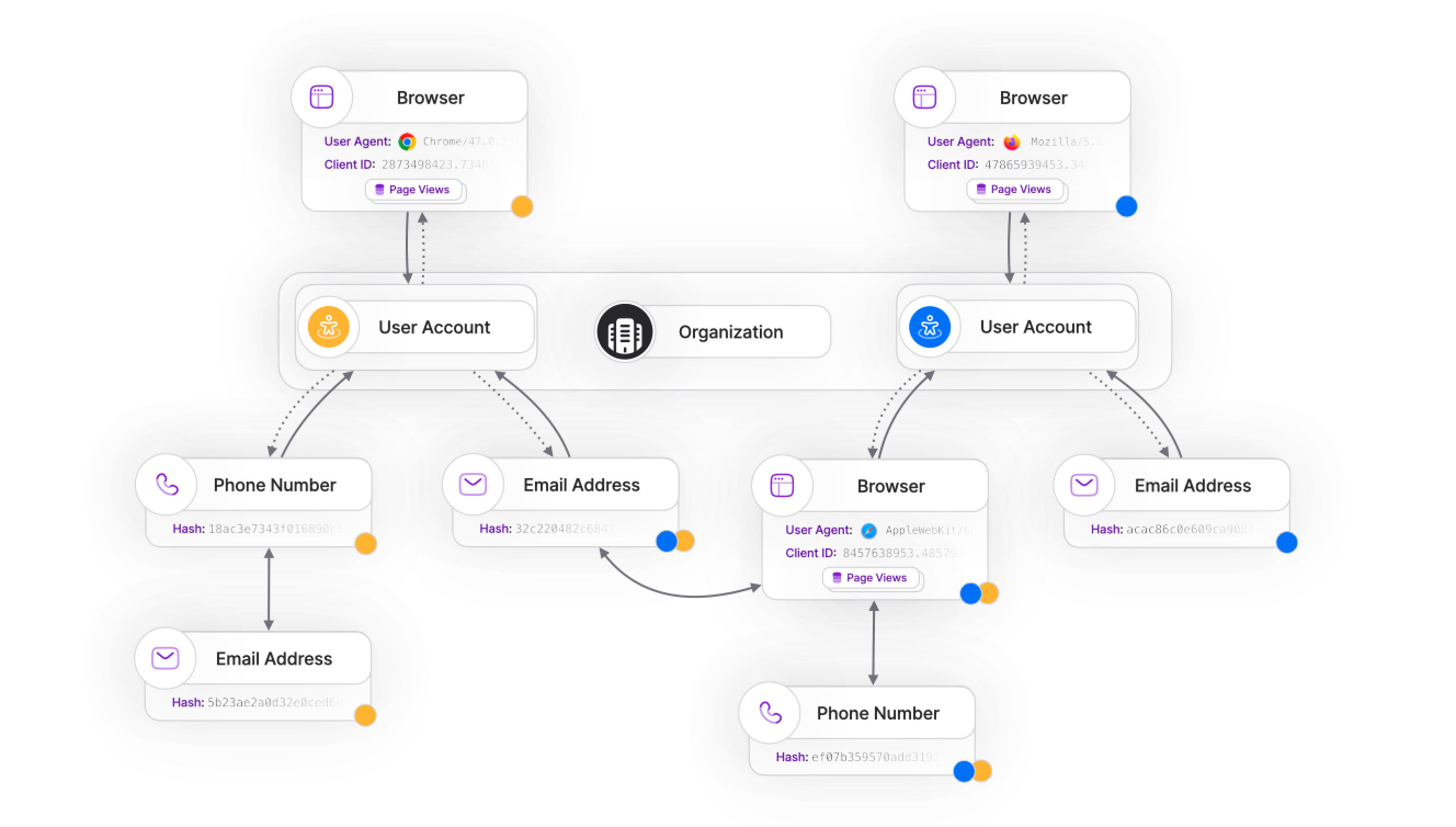
**Identity Resolution** connects customer identifiers across devices, sessions, and accounts to build a complete view of each user's journey. OneView uses this to enrich [Enhanced Conversions](/docs/platform/features/delivery/enhanced-conversions) with the most complete set of identifiers available, increasing match rates with advertising platforms.
**Understanding identifiers:**
Identifiers fall into two categories:
* **Anonymous identifiers**: Browser cookies, device IDs, session IDs — temporary and device-specific
* **Authenticated identifiers**: Email addresses, phone numbers, user IDs — persistent and account-based
When a user signs up or logs in, OneView links their anonymous browsing history to their authenticated account, creating a complete customer profile.
## How Identity Resolution works
OneView builds an **Identity Graph** that connects all identifiers without requiring a centralized master ID. This allows you to incrementally build profiles as users interact with your site, without needing to know in advance which identifiers belong together.
### Connection events
Identities link automatically when users perform connecting actions:
| Action | Identifiers Linked | Example |
| ---------------- | ------------------------- | ---------------------------------------------- |
| **Sign up** | Anonymous session → Email | User browses anonymously, then creates account |
| **Add phone** | Email → Phone number | User adds phone to existing account |
| **Update email** | Old email → New email | User changes email address |
| **Login** | Session → User ID | User logs in from new device |
As long as you send identifiers together at some point in the customer journey, your Identity Graph will link them automatically, even if events occur out of order, as long as they happen **before the conversion time**.
### Enhanced Conversions enrichment
OneView uses your Identity Graph to automatically enrich Enhanced Conversions with the most complete set of identifiers available:
| Scenario | Identifiers Included |
| --------------------- | ----------------------------------- |
| **User signed up** | Email, phone (if provided), user ID |
| **Anonymous visitor** | Client ID, device ID |
| **Cross-device** | All identifiers from linked devices |
Enhanced Conversions are automatically enriched with identifiers from your Identity Graph. This increases match rates with advertising platforms, especially when click identifiers are missing or expired.
## Retroactive enrichment
To maintain **historical consistency**, after a conversion is processed, newly found identifiers are not retroactively computed to change the attribution of that conversion.
You may choose to **re-attribute** a specific conversion if you need to re-evaluate its attribution based on information available after its `conversion_time`. Please note that re-attributing a conversion breaks **historical consistency**, so proceed with caution.
You should instead model your funnel using different [conversion events](/docs/platform/concepts/conversions), one for each key step of the funnel.
## Common questions
As long as you send identifiers together at some point in the customer journey, your **Identity Graph** will link them automatically, even if the events occur out of order, as long as they happen **before the conversion time** — for example:
* `client_id` and `email`
* `phone` and `user_id`
* `user_id` and `email`
Linking identifiers **after** a conversion is considered **Retroactive Enrichment** (see above).
For special use cases, you can also send additional identifiers explicitly using the [GTM Server Template](/docs/guides/sending-events/backend/gtm-server).
It depends on the Media Partner. Most platforms accept:
* **Email** (hashed)
* **Phone number** (hashed)
* **User ID** (if provided)
Check each integration's documentation for specific requirements. OneView automatically includes all available identifiers from your Identity Graph.
When click identifiers (like `gclid`, `fbclid`) are blocked or expire due to [Intelligent Tracking Prevention](/docs/platform/guides/sending-events/advanced-setup/intelligent-tracking-prevention), OneView uses Enhanced Conversions with identifiers from your Identity Graph to maintain attribution accuracy.
This allows advertising platforms to match conversions on their end using the hashed identifiers you provide, even when click IDs are unavailable.
## Next steps
Learn how OneView automatically includes PII in conversions for higher match rates.
Understand how conversions are processed and attributed across platforms.
## What is Identity Resolution?
**Identity Resolution** connects customer identifiers across devices, sessions, and accounts to build a complete view of each user's journey. OneView uses this to enrich [Enhanced Conversions](/docs/platform/features/delivery/enhanced-conversions) with the most complete set of identifiers available, increasing match rates with advertising platforms.
**Understanding identifiers:**
Identifiers fall into two categories:
* **Anonymous identifiers**: Browser cookies, device IDs, session IDs — temporary and device-specific
* **Authenticated identifiers**: Email addresses, phone numbers, user IDs — persistent and account-based
When a user signs up or logs in, OneView links their anonymous browsing history to their authenticated account, creating a complete customer profile.
## How Identity Resolution works
OneView builds an **Identity Graph** that connects all identifiers without requiring a centralized master ID. This allows you to incrementally build profiles as users interact with your site, without needing to know in advance which identifiers belong together.
### Connection events
Identities link automatically when users perform connecting actions:
| Action | Identifiers Linked | Example |
| ---------------- | ------------------------- | ---------------------------------------------- |
| **Sign up** | Anonymous session → Email | User browses anonymously, then creates account |
| **Add phone** | Email → Phone number | User adds phone to existing account |
| **Update email** | Old email → New email | User changes email address |
| **Login** | Session → User ID | User logs in from new device |
As long as you send identifiers together at some point in the customer journey, your Identity Graph will link them automatically, even if events occur out of order, as long as they happen **before the conversion time**.
### Enhanced Conversions enrichment
OneView uses your Identity Graph to automatically enrich Enhanced Conversions with the most complete set of identifiers available:
| Scenario | Identifiers Included |
| --------------------- | ----------------------------------- |
| **User signed up** | Email, phone (if provided), user ID |
| **Anonymous visitor** | Client ID, device ID |
| **Cross-device** | All identifiers from linked devices |
Enhanced Conversions are automatically enriched with identifiers from your Identity Graph. This increases match rates with advertising platforms, especially when click identifiers are missing or expired.
## Retroactive enrichment
To maintain **historical consistency**, after a conversion is processed, newly found identifiers are not retroactively computed to change the attribution of that conversion.
You may choose to **re-attribute** a specific conversion if you need to re-evaluate its attribution based on information available after its `conversion_time`. Please note that re-attributing a conversion breaks **historical consistency**, so proceed with caution.
You should instead model your funnel using different [conversion events](/docs/platform/concepts/conversions), one for each key step of the funnel.
## Common questions
As long as you send identifiers together at some point in the customer journey, your **Identity Graph** will link them automatically, even if the events occur out of order, as long as they happen **before the conversion time** — for example:
* `client_id` and `email`
* `phone` and `user_id`
* `user_id` and `email`
Linking identifiers **after** a conversion is considered **Retroactive Enrichment** (see above).
For special use cases, you can also send additional identifiers explicitly using the [GTM Server Template](/docs/guides/sending-events/backend/gtm-server).
It depends on the Media Partner. Most platforms accept:
* **Email** (hashed)
* **Phone number** (hashed)
* **User ID** (if provided)
Check each integration's documentation for specific requirements. OneView automatically includes all available identifiers from your Identity Graph.
When click identifiers (like `gclid`, `fbclid`) are blocked or expire due to [Intelligent Tracking Prevention](/docs/platform/guides/sending-events/advanced-setup/intelligent-tracking-prevention), OneView uses Enhanced Conversions with identifiers from your Identity Graph to maintain attribution accuracy.
This allows advertising platforms to match conversions on their end using the hashed identifiers you provide, even when click IDs are unavailable.
## Next steps
Learn how OneView automatically includes PII in conversions for higher match rates.
Understand how conversions are processed and attributed across platforms.