> ## Documentation Index
> Fetch the complete documentation index at: https://oneviewhub.com/docs/llms.txt
> Use this file to discover all available pages before exploring further.
# Events
> Understanding events - the building blocks of digital marketing measurement.
## What is an Event?
An event is any action a user takes on your website that you want to track. Think of events as the moments that matter in your customer journey.
 ## Examples of Events
* **View Product** - User looks at a product page
* **Add to Cart** - User adds item to shopping cart
* **Purchase** - User completes checkout
* **Sign Up** - User creates an account
* **Download PDF** - User downloads a whitepaper
* **Book Demo** - User schedules a sales call
* **Start Trial** - User begins free trial
* **Subscribe** - User becomes paying customer
* **Article View** - User reads an article
* **Video Play** - User starts watching video
* **Newsletter Signup** - User subscribes to emails
* **Share** - User shares content
## How Events Work
Events flow through OneView's processing pipeline:
| Step | Action | OneView Feature |
| ------------------------- | ---------------------------------------------- | ----------------------------------------------------------------------------------------------------- |
| **1. Event sent** | Your website sends event to OneView | [Cookieless Advertising](/docs/platform/features/collection/cookieless-advertising) stores Click IDs |
| **2. Consent checked** | OneView verifies user consent | [Consent Enforcement](/docs/platform/features/collection/consent-enforcement) respects consent signals |
| **3. Identifiers linked** | OneView connects user identifiers | [Identity Resolution](/docs/platform/features/processing/identity-resolution) enriches with Identity Graph |
| **4. Duplicates blocked** | OneView prevents duplicate processing | [Deduplication](/docs/platform/features/processing/deduplication) uses idempotency keys |
| **5. Conversion sent** | If configured as conversion, sent to platforms | [Enhanced Conversions](/docs/platform/features/delivery/enhanced-conversions) includes hashed PII |
OneView automatically processes all events through its pipeline, ensuring accurate tracking, compliance, and delivery without manual configuration.
## Event Types
| Event Type | Description | Can Be Conversion? |
| -------------------- | ---------------------------------------- | ------------------ |
| **Page View** | User views a page | ❌ No |
| **Conversion Event** | User completes a goal (purchase, signup) | ✅ Yes |
| **Identify Event** | User is recognized (login, signup) | Optional |
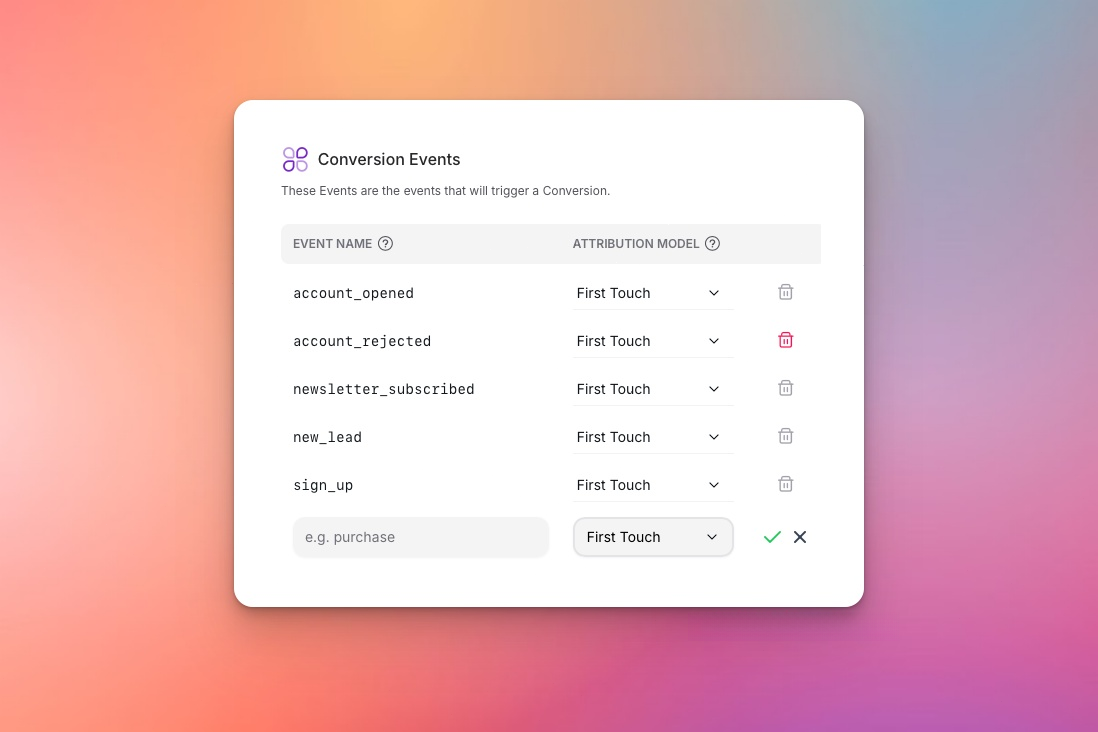
**Conversion Events** are events you configure as conversions in your workspace. These are sent to advertising platforms via Conversion API for campaign optimization. Learn more about [Conversions](/docs/platform/concepts/conversions).
## Common Questions
Start with 3-5 key events:
* Your main conversion (Purchase/Signup)
* One mid-funnel action (AddToCart/Trial)
* One top-funnel action (ViewContent)
Add more as needed, but avoid over-tracking.
That's normal and good! The customer journey includes multiple events:
ViewContent → AddToCart → Purchase
Each event helps platforms understand user behavior. OneView's [Identity Resolution](/docs/platform/features/processing/identity-resolution) connects these events to the same user across devices and sessions.
Yes. But you cannot create Conversions out of pageviews. Page views help OneView build your [Identity Graph](/docs/platform/features/processing/identity-resolution) and track user journeys, but only specific events can be configured as conversions.
OneView's [Deduplication](/docs/platform/features/processing/deduplication) system automatically prevents duplicate events from being processed using idempotency keys. The same event with the same idempotency key is processed only once.
## Next Steps
Learn about conversion events and how OneView processes them.
Start tracking your events with OneView.
## Examples of Events
* **View Product** - User looks at a product page
* **Add to Cart** - User adds item to shopping cart
* **Purchase** - User completes checkout
* **Sign Up** - User creates an account
* **Download PDF** - User downloads a whitepaper
* **Book Demo** - User schedules a sales call
* **Start Trial** - User begins free trial
* **Subscribe** - User becomes paying customer
* **Article View** - User reads an article
* **Video Play** - User starts watching video
* **Newsletter Signup** - User subscribes to emails
* **Share** - User shares content
## How Events Work
Events flow through OneView's processing pipeline:
| Step | Action | OneView Feature |
| ------------------------- | ---------------------------------------------- | ----------------------------------------------------------------------------------------------------- |
| **1. Event sent** | Your website sends event to OneView | [Cookieless Advertising](/docs/platform/features/collection/cookieless-advertising) stores Click IDs |
| **2. Consent checked** | OneView verifies user consent | [Consent Enforcement](/docs/platform/features/collection/consent-enforcement) respects consent signals |
| **3. Identifiers linked** | OneView connects user identifiers | [Identity Resolution](/docs/platform/features/processing/identity-resolution) enriches with Identity Graph |
| **4. Duplicates blocked** | OneView prevents duplicate processing | [Deduplication](/docs/platform/features/processing/deduplication) uses idempotency keys |
| **5. Conversion sent** | If configured as conversion, sent to platforms | [Enhanced Conversions](/docs/platform/features/delivery/enhanced-conversions) includes hashed PII |
OneView automatically processes all events through its pipeline, ensuring accurate tracking, compliance, and delivery without manual configuration.
## Event Types
| Event Type | Description | Can Be Conversion? |
| -------------------- | ---------------------------------------- | ------------------ |
| **Page View** | User views a page | ❌ No |
| **Conversion Event** | User completes a goal (purchase, signup) | ✅ Yes |
| **Identify Event** | User is recognized (login, signup) | Optional |
**Conversion Events** are events you configure as conversions in your workspace. These are sent to advertising platforms via Conversion API for campaign optimization. Learn more about [Conversions](/docs/platform/concepts/conversions).
## Common Questions
Start with 3-5 key events:
* Your main conversion (Purchase/Signup)
* One mid-funnel action (AddToCart/Trial)
* One top-funnel action (ViewContent)
Add more as needed, but avoid over-tracking.
That's normal and good! The customer journey includes multiple events:
ViewContent → AddToCart → Purchase
Each event helps platforms understand user behavior. OneView's [Identity Resolution](/docs/platform/features/processing/identity-resolution) connects these events to the same user across devices and sessions.
Yes. But you cannot create Conversions out of pageviews. Page views help OneView build your [Identity Graph](/docs/platform/features/processing/identity-resolution) and track user journeys, but only specific events can be configured as conversions.
OneView's [Deduplication](/docs/platform/features/processing/deduplication) system automatically prevents duplicate events from being processed using idempotency keys. The same event with the same idempotency key is processed only once.
## Next Steps
Learn about conversion events and how OneView processes them.
Start tracking your events with OneView.